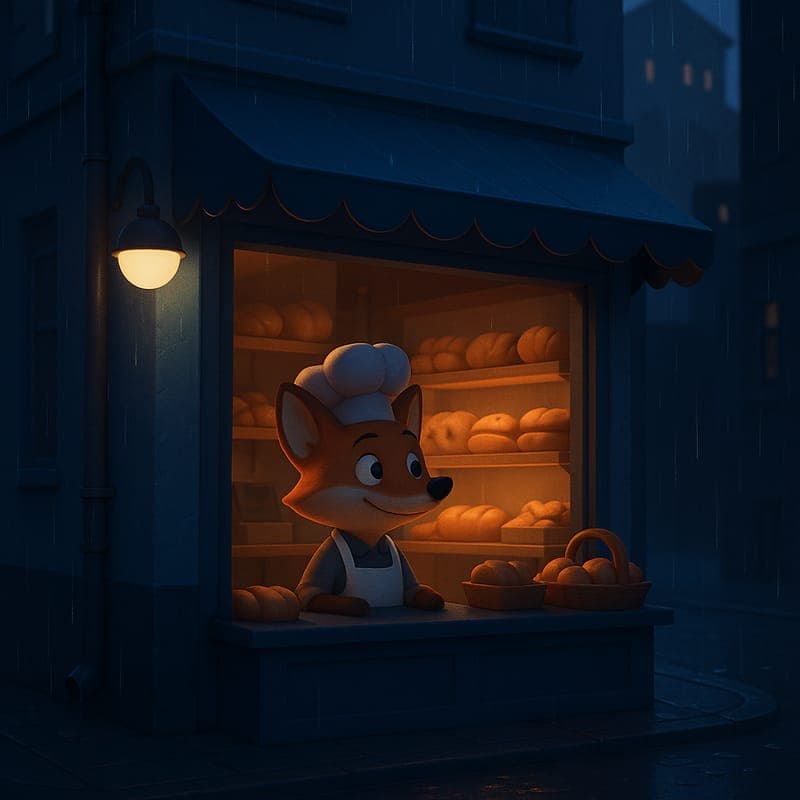
Studio-look 3D toon from a prompt

Make a 3D cartoon video without modeling or rigging anything.

The big-studio 3D look normally sits behind the most expensive pipeline in animation: modeling, rigging, texturing, lighting, and render time. CartoonMakerAI's 3D Toon style produces a smooth 3D-animated render with soft rim lighting from a written scene description, generated as a chain of consistent scenes.

Built for

Brand and product storytellers · Explainer video makers · Mascot-led channels · Small teams wanting a premium look

A smooth 3D toon fox mascot baking bread by a rain-streaked bakery window

The practical difference

The most premium-feeling visual register in the catalog: use it when the content should read as polished and intentional — product stories, brand explainers, mascot-led formats — without a 3D production pipeline.

What the workflow helps you do

Make every scene serve the larger idea.

01

A premium register without the premium pipeline

Audiences associate the smooth 3D toon look with big-studio production values, which is why brands pay heavily for it. Generating it as a style means the polish comes from a style choice and a clear brief, not from modeling, rigging, and render-farm hours — the traditional reasons 3D was out of reach for small teams.

02

Built for product and brand storytelling

3D toon's soft rim lighting and dimensional shading flatter objects and mascots: products look tangible, characters look designed. That makes it the natural choice for explainers where the thing on screen is the point, and for mascot-led channels where a recognisable character carries every episode.

03

One consistent 3D world across a longer story

In real 3D production, consistency comes from reusing the same models and rigs. Here it comes from scene chaining: each clip is seeded from the previous scene's final frame, so the mascot, set, and lighting carry through a 60- or 90-second sequence instead of resetting at every cut.

A better starting point

A production process you can repeat.

Use this as a planning sequence, not a rigid formula. The goal is to make the creative and editorial decisions before rendering so that the generated scenes have a clear job to perform.

See 3D explainer examples
  1. 01

    Decide what the polish is for

    3D toon signals intentional, produced content. Define the audience and the one thing the video should make them understand or feel — a product's core benefit, a brand story beat, a mascot's personality. Polish without a point reads as an ad nobody asked for.

  2. 02

    Design the mascot and set in words

    Describe the recurring character's shape, palette, and personality, and the setting's key surfaces and lighting. Dimensional styles reward physical description — materials, reflections, depth — more than flat styles do, because the render has more visual information to express.

  3. 03

    Generate the scene chain

    The idea is split into scene-sized beats and generated as chained clips. Give each beat one job — introduce the character, show the problem, demonstrate the change, land the ending — so the finished explainer reads as one designed piece rather than a montage.

  4. 04

    Review like a brand, not a hobbyist

    Check the first three seconds, the readability of the product or mascot on a phone screen, continuity of the character between scenes, and whether the ending delivers the promise. The premium register raises viewer expectations; review against them before publishing.

Editorial guardrails

The part AI should not decide for you.

Reserve 3D toon for content that benefits from weight

Dimensional rendering adds visual gravity. Product demos, brand stories, and flagship explainers benefit; quick topical shorts or cozy story-time often land better in lighter styles like cel classic or watercolor. Match the register to the content's role in your channel.

Build a mascot system, not a one-off character

If the 3D character will recur, document its proportions, palette, signature pose, and typical setting in a short reference brief you paste into every prompt. Consistent description is what keeps a mascot recognisable across episodes.

Compare against 2D before committing a series

Generate the same short script in 3D toon and in a flat style, then compare against your actual audience. The premium look is an asset only when viewers of your niche respond to it; the free tier exists to test exactly this before a channel commits.

Use this as a starting brief

Example prompt

Create a 60-second 3D toon product explainer for a small coffee brand. A round, cheerful 3D fox mascot walks through a cosy roastery at golden hour, following one coffee bean from roasting drum to finished cup. Smooth studio-style shading, soft rim lighting, warm palette, shallow depth on close-ups of the bean. Keep the same fox, roastery set, and lighting throughout, and end on the mascot sliding the cup toward the camera. Compose for 16:9.

Adapt the audience, platform, character, story change, and visual style. The more the brief reflects your own format, the less the finished video will feel interchangeable.

Frequently asked questions

Useful questions before you start.

Do I need 3D modeling or rigging skills?

No. The 3D toon look is a rendered style applied to generated video, not a modeling pipeline. You describe the character, setting, and action in words; there are no meshes, rigs, or render settings to manage.

How is this different from Pixar-style studio animation?

It reproduces the visual register — smooth dimensional shading, soft rim lighting, designed characters — not a studio's proprietary pipeline or level of hand-crafted control. It is built for creators and brands who need the polished 3D feel for published content, not feature-film production.

Can I make a 3D cartoon longer than one short clip?

Yes. Longer videos are produced as a chain of scene-sized clips, each seeded from the previous scene's final frame, so the mascot, set, and lighting stay consistent across the full sequence.

When should I choose 3D toon over a 2D cartoon style?

Choose 3D toon when the content should read as premium and produced — product explainers, brand storytelling, mascot-led flagship episodes. Choose a 2D style like cel classic for approachable narrative content, or claymation and watercolor for a handmade, calm register.

Can I use 3D toon videos for my business or clients?

Commercial use is included on the Creator and Pro plans. The free tier (30 one-time credits, watermarked, 720p) lets you test whether the register suits your brand before subscribing.

Start with an idea worth finishing.

Give the prompt a point of view, a viewer, and a clear final beat. The rest of the workflow becomes far easier to shape.