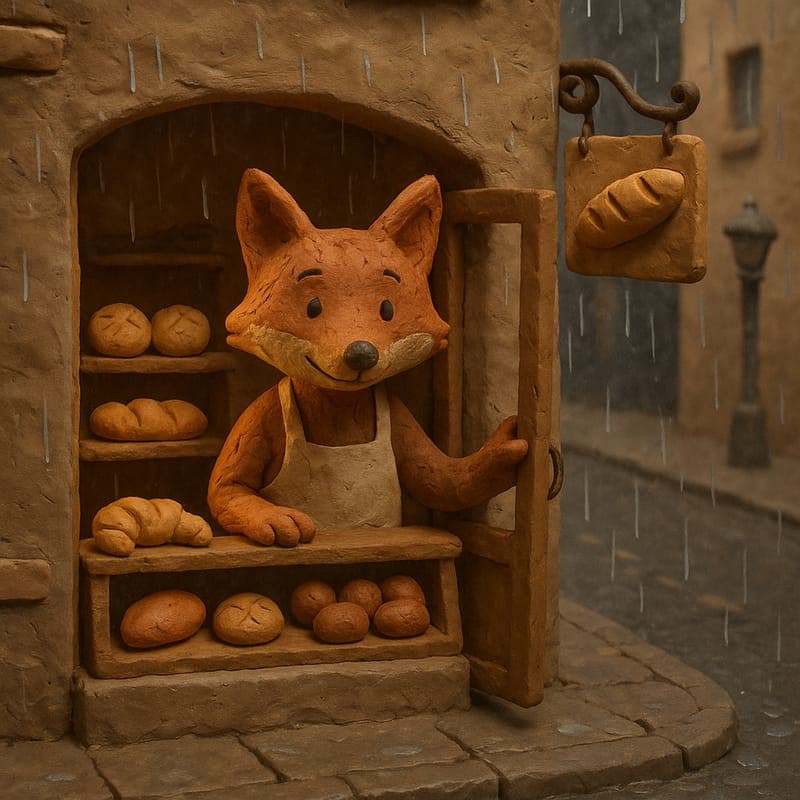
Stop-motion look, prompt-based workflow

Make a claymation-style video without a stop-motion studio.

Traditional clay animation means armatures, sculpting, and photographing twelve poses for every second of footage. CartoonMakerAI produces the claymation aesthetic — visible clay texture, soft studio lighting, an earthy handmade palette — from a written scene description, built as a chain of consistent scenes.

Built for

Kids-content creators · Cozy and bedtime-story channels · Craft and handmade-feel brands · Creators who want a distinctive look

A stop-motion-style clay fox kneading dough in a tiny bakery

The practical difference

The handmade warmth of stop-motion clay as a rendered style: describe the story once, choose Claymation, and generate a consistent tactile sequence instead of weeks of physical production.

What the workflow helps you do

Make every scene serve the larger idea.

01

Get the tactile signal without the physical labor

Claymation reads as handmade — visible fingerprints in the clay, slightly imperfect motion, warm sculptural lighting. That signal is why the style is memorable in a feed of flat vector cartoons. Generating it as a style keeps the aesthetic while replacing weeks of sculpting and frame-by-frame shooting with a written brief.

02

Match the style to content that earns it

Clay characters read as soft, friendly, and touchable, which suits kids' education, bedtime and cozy content, and brands built on craftsmanship. The same qualities make it a weaker fit for fast action or sleek tech explainers — choose claymation because it serves the content, not because it is novel.

03

Keep a consistent clay character across a whole story

The hardest part of a longer claymation-style video is continuity: the same character, set, and lighting from scene to scene. The scene-chaining workflow seeds each new clip from the previous scene's final frame, so a 60- or 90-second story keeps one coherent handmade world rather than resetting every cut.

A better starting point

A production process you can repeat.

Use this as a planning sequence, not a rigid formula. The goal is to make the creative and editorial decisions before rendering so that the generated scenes have a clear job to perform.

Read the claymation guide
  1. 01

    Choose a small, physical story

    Claymation suits simple, tangible actions — kneading, stacking, planting, tidying. Write a brief with one or two characters, one location, and a story a viewer could follow with the sound off. Real stop-motion productions limit their casts and sets for cost reasons; the aesthetic reads most authentically under the same constraint.

  2. 02

    Describe the tactile details

    Mention the clay texture, the warm studio lighting, and the small hand-scale actions in the prompt. A scene about a clay fox pressing dough gives the style something physical to render; a vague request for a clay video does not.

  3. 03

    Generate the scene chain

    The idea is split into scene-sized beats and generated as chained clips, each seeded from the last frame of the previous one. Every beat should have one visual job — establish, advance, turn, or resolve — so the finished sequence feels like one deliberate piece.

  4. 04

    Review for handmade pacing

    Watch the result as a viewer: the claymation aesthetic implies calm, deliberate motion, so check that the pacing feels crafted rather than rushed, that the character stays consistent between scenes, and that the first three seconds establish the world. Regenerate individual weak beats rather than restarting.

Editorial guardrails

The part AI should not decide for you.

Lean into the cozy register

The earthy palette and soft lighting of claymation naturally signal warmth and wind-down. Bedtime stories, gentle routines, and seasonal content get the most out of the style; pair it with a slower narration pace and let the texture do part of the emotional work.

Use claymation as a channel identity, not a one-off

A distinctive style compounds: if every episode shares the clay look, the same recurring character, and a familiar set, thumbnails and openings become recognisable at a glance. A single claymation video in an otherwise flat-cartoon channel wastes most of the differentiation.

Know when a different style serves better

Fast action suits anime, polished product storytelling suits 3D toon, and high-contrast drama suits noir comic. If the content fights the claymation register, switch styles rather than forcing the texture onto a story it does not fit.

Use this as a starting brief

Example prompt

Create a 60-second stop-motion claymation-style video for a cozy kids' channel. A small clay hedgehog prepares its burrow for the first night of autumn: gathering three leaves, patting a clay blanket flat, and setting a tiny acorn lamp glowing. Keep the visible clay texture, soft warm studio lighting, and an earthy palette throughout. One burrow set, one character, calm deliberate motion, gentle ending as the lamp dims. Compose for 16:9.

Adapt the audience, platform, character, story change, and visual style. The more the brief reflects your own format, the less the finished video will feel interchangeable.

Frequently asked questions

Useful questions before you start.

Is this real stop-motion clay animation?

No. It generates video that reproduces the visual signature of claymation — clay texture, sculptural lighting, handmade palette — without physical clay or frame-by-frame photography. For published digital content the audience experiences the aesthetic either way; a gallery installation that needs real clay is a different project.

How much faster is this than traditional claymation?

Professional stop-motion teams commonly measure output in seconds of footage per day of studio work, after sets and puppets already exist. A 60–90 second claymation-style video here is a written brief, a style choice, and a render — and revision means re-prompting a scene, not re-sculpting and re-shooting it.

Can I make a claymation video longer than one short clip?

Yes. Longer ideas are produced as a chain of scene-sized clips, with each new scene seeded from the previous scene's final frame so the character, set, and lighting stay consistent across the full video.

What content suits the claymation style best?

Kids' and educational videos, bedtime and cozy content, and brand content with a handmade or craft identity are the strongest fits. The soft, tactile register is less suited to fast action or sleek tech explainers, where anime or 3D toon styles match expectations better.

Can I use claymation-style videos commercially?

Commercial use is included on the Creator and Pro plans. The free tier (30 one-time credits, watermarked, 720p) is intended for testing whether the look fits your channel before committing.

Start with an idea worth finishing.

Give the prompt a point of view, a viewer, and a clear final beat. The rest of the workflow becomes far easier to shape.